Thursday, September 09, 2010
Oops, Bad User Experience
Posted by
James Fryer
at
8:44 PM
0
comments
Labels: Design, Rant, Web Development
Saturday, May 30, 2009
Google Wave
What is Google Wave?
Google Wave is a 'next generation' email system. It takes cues from Gmail and builds a new model for conversation over the web. A simplistic way of looking at it is to say that it is a mash up of an email app, IM client, Wiki, blog, and photo sharing site. A more sophisticated way of seeing it is as email reimaged, or thinking about how one would build a communication system on the web starting from scratch.
Google Wave not only changes how we use email, but also how the nuts and bolts of it work. Resources (like images) are uploaded once and then shared where ever they need to be, in a document, a photo album, a blog, etc... And Wave will allow 'drag and drop' of images (and maybe other files?) into the browser directly from your desktop onto the web.
Instant Message or Email? Yes, both.
Currently, during an Instant Message conversation, each person waits while the other types. No more, as one person types, the other sees each word, indeed each letter, as they are typed. This instant and continual connection is what dissolves the line between what an email is and what an instant message is. Conversations can be conducted as they would in a current email environment, or can be treated like a chat session.
You say 'Conversation' I say 'Wave'
One of Gmail's innovations was the inventions of 'conversations'. In the 'old days', emails would be bounced back and forth between users and would whined up scattered across the inbox. But Gmail automatically consolidated all these emails into on expandable conversation. The new basic unit in Google Wave is simply called a Wave which is basically the same thing as a current Gmail conversation, but on steroids (legal ones of course). A Wave can be replied to like a conventional email, or the recipient can insert a reply anywhere in the original wave, so the reply has context. In addition, the recipient can edit the original email, treating it like a collaborative document.
This free wheeling editing capability could get confusing and downright dangerous if not for a basic feature built into the frame work of Google Wave: a timeline. This timeline can be used to 'roll back' the conversation within the wave to see who added or deleted what and when. It is a simple and intuitive method of tracking changes and makes this whole email thing much more elegant. You can seamlessly flow from a typical 'email' into a collaborative document to a chat and back again, the hole time being able to see exactly where the story started and how it grew.
Bona Fide
If it is not clear just how big of a step forward this is, know that Wave is from the same guys who did Google Maps. Google Maps completely revolutionized online maps. Every other mapping system has been chasing (copying) Google Maps for years. I expect the same will be true of Wave.
Mobile Integration
The developers of Google Wave have worked very hard to make all different kinds of communication seamless. Wave can be used like the email you know and love or like IM. But the developer's zeal for seamlessness did not stop there, they built the system from the ground up to work beautifully both on your desktop and on your mobile phone. There certainly is a difference between the mobile and desktop versions, but the parity between them far exceeds the differences.
For you, for me, it's free, it's Open Source.
Not only is the design and functionality of Wave extraordinary, but so is Google's approach to the platform, they are giving it away. Anyone can download and install Wave on their own server and run with it, no strings attached. The code is open and the dev team has made is easy to create 'extensions' that make Wave do what you want it to do. This is extremely powerful, what we have seen of Wave so far really is just the early iterations of the dev team, but Wave is more a frame work than a final product. I expect that Wave will evolve in many different ways in the coming years and that has the power to solidify it's continued success.
But when a developer takes Wave and makes it his own, that does not leave the developer on his own lonely product fork. Nope, Google Wave is designed to work with variants of itself. You can customize it and still have it play nice with someone else's customized Wave.
Plays nice with social networks
As I mentioned at the top, one of the core ideas is to create the content once and share it where every you want. That means plopping a Wave component down into your FaceBook page, should you be so inclined. Post a 'Wave' to blog? Sure thing, and it retains all its 'Wave like' properties. If you update the Wave, the Blog reflects that change as you change it.
Powerfully extensible
Google not only lets people mess with Wave, they want people to mess with Wave. The Wave dev team created a simple API for creating extensions. By doing this, they have invited a lot of people to the party. Think about how successful Firefox has become, in no small part because that is what they did. There are thousands of extensions for Firefox that let it do all kinds of things from grabbing video from YouTube to notifying you when you have a new email. Google is not staffed by dummies and they are not to proud to take a play out of the Firefox's playbook.
The Wave dev team has built a few of their own extensions to get the ball rolling. One of the most impressive is Rosie that instantly translates Waves into your language, letting you chat (in real time) with someone typing in a foreign language.
Other examples of Wave's extensions are:
- Integrated with Twitter
- Play Chess in real time in a Wave
- (the aforementioned) ability to automatically post a Wave to a blog
Wave is in beta now, open only to a select group of developers. It is scheduled to be released at the end of the summer (2009). As it stands, one glaring omission from Wave is calendar functionality. I have little doubt that it will be added in at some point. Maybe it is such a large feature set that it was not ready for the preview. Or maybe that functionality will be added through an extension. Or maybe, just maybe Google did not want to scare Microsoft too much.
I can not know or speculate if Google intentionally targeted Microsoft's Exchange server (that runs most company's email systems) or if the threat that Wave posses to Exchange is just a byproduct of Google's desire to build the next generation internet communication platform. Either way, Wave certainly is the scariest thing to happen for Microsoft since Firefox. In fact, it is significantly scarier.
If Wave proves to be reliable and secure, Exchange will have a competitor like nothing it has seen before. IT departments around the world will have the option of a wildly powerful, extensible, and controllable communications platform in Wave. And it is free. Compared to a buggy, semi-secure, closed, and expensive alternative (Exchange).
Wave lacks two things that Exchange has; Exchange is the leader so it is what IT departments know, and Exchange has integration with Outlook's calendar features. Outlook lets a company know who is doing what, when, and where. It is a massively powerful tool. If and when Wave adds similar (or, based on what we have seen from Wave so far, superior) features, Microsoft will be in real danger of loosing it's grip on the business market and by extension, it's grip on the operating system market. Oh, did I not mention, because Wave is completely web based, it does not matter what operating system people are using to access it, it is all the same. Unless you are running Internet Explorer which was distinctly absent from the list of browsers that Wave will work in. But then, if you are still running Internet Explorer, you have bigger problems...
There is a lot of work still to do on Wave, and a lot of ground it has to cover before it can even be considered a threat to Microsoft. But, in my mind, it is the first real challenge that could be a serious threat to Microsoft as a whole.
And to be frank, Microsoft does not look to be in a position to deal with a serious competitor right now. They look better now than they have for years, they are set to release Windows 7 that may be their first operating system that does not suck since Windows 2000. They recently launched their new search engine, 'bing' that also does not suck. It may even be on par with Google. But, 'not sucking' is no way to compete with a serious threat. And when you release a new product, it can not be 'just as good as', it needs to be better, otherwise who cares?
Posted by
James Fryer
at
4:11 PM
0
comments
Labels: Computer/Internet, Web Development
Friday, March 13, 2009
AdSense Interest-Based Advertising
Over the coming months, Google will be rolling out a new feature to their AdSense system called "Interest-Based Advertising". If you are not familiar with AdSense, scroll down a little and a look in the right hand column. See the light blue box that says at the top, "Ads by Google"? That is AdSense. Ads in that box are automatically placed there by Google. Google scans the content of my site and figures out which ads match that content. I write about photography a lot, so most of the ads are photography related. I get a couple of pennies every time those ads are clicked.
With this new "Interest-Based Advertising" system, Google will change the way it determines which ads will appear. Ad selection will now be, at least in part, determined by a visitor's profile that has been built up over time. What that means is that Google will track your movements on the Internet and determine what you are interested in. Don't get paranoid, it can only track you on Google properties and sites with AdSense. Google requires all participating sites to disclose this in their Privacy Policy. If you look at a lot of photography related sites, Google will think you are a photographer and show you photography related ads. It will not matter too much which site you are on, if the site has AdSense, Google will populate that site with photography ads.
This is the logical path for Google to follow, but I'm not crazy about it and think that, to some extent, it is a bad idea. It too easily pigeon-holes a person into being one type of shopper, in essence, one type of person. Sure, I look at a lot of photography equipment, but what if I decide I want to start scuba diving? If I go to a scuba blog, will I still see ads for photography? Now, it's reasonable to assume that Google will eventually realize I am now a photographer and a scuba diver, but how long does that take?
This may water down the effectiveness of AdSense as there will always be a lag between what Google thinks my interests are and what my interest is at that moment. For instance, if I go to a blog about baby cribs to read up on those for the first time, AdSense may show me ads for photography, because that is what Google has determined my interest to be. Well, I'm not shopping for photo gear, I'm shopping for cribs. Eventually, Google will figure that out, but that is of no use to that first web site I went to. That web site owner won't get any of my clicks because they are not relevant to what I want right now. This, ironically, may hurt the most relevant web sites that show up at the very top of Google search results as you will look at those sites before Google has a chance to figure out that you are now looking for cribs.
Can I turn "Interest-Based Advertising" off?
Yes, Interest-Based Advertising can be turned off. Both as a web site owner and a surfer.
If you are a web site owner, you can go into your AdSense account and opt out of this new system in which case, ads will be served to your site they way they have been. Here is how you turn off Interest-Based Advertising. Though, Google is implying that you may not have access to the same pool of ads because some advertisers may opt to only put ads on sites that are using Interest-Based Advertising.
If you are browsing the Internet and you don't want Google to track your activity for use with this system, you can opt out of the tracking cookie here. If you want to take advantage of this new system, but want more control, you can set your preferences here.
So far, I have only talked about the potential doom and gloom of this new system, but it can be a good thing too. It will allow advertisers to target their audience much more precisely, and most importantly, on an ongoing basis. An advertiser could setup their ads to remember how you have interacted with them in the past. For instance, say I click on an AdSense ad for camera equipment on Amazon.com. Amazon has the power now to remember the information for the next AdSense delivered ad I see from them. Maybe I clicked on an add for a specific camera and bought it. Amazon has the ability to then tailor the next ad I see from them to maybe some lens or other accessory for that camera which they currently have on sale. The interaction possibilities are almost endless and may give the consumer more timely and relevant ads. That can be good for the consumer and the web site owner because it means I will be clicking on more of their ads and they get more of Google's pennies.
And, this being Google, they are smarter then I so it is likely that they are at least aware of these pitfalls and are working to minimize them, or make them go away entirely.
I've turned off the Interest-Based Advertising on this site for now, I don't want to be part of the 'beta' project. But I will be keeping an eye on the system and experimenting with it in the coming years to see if it becomes more of a helpful or harmful service.
Posted by
James Fryer
at
8:48 AM
0
comments
Labels: Computer/Internet, Web Development
Sunday, February 08, 2009
Fusion Essentials Non-Review
I am in the market for a new Web Design application and NetObjects Fusion Essentials looked interesting enough to take out for a test spin.
I installed, registered it (they require an email address and verification - tacky), and started it up.
Then I tried to open a site I've been working on. Trouble is, the site is built with PHP pages, not HTML pages. Fusion Essentials does not recognize PHP files, so I could not open anything on the site.
A 'Web Design' application that can not open and edit PHP files? Seriously? Even Kompozer will open and edit PHP files. Not only that, Kompozer will render HTML markup in its WYSIWYG mode. Heck, even Notepad will at least open PHP files!
Posted by
James Fryer
at
2:15 PM
0
comments
Labels: Web Development
Wednesday, December 17, 2008
Need to test in different browsers?
The fact is, different web browsers can display the same page differently. For this reason, web designers have to test HTML web page designs in all the common web browsers or face the very real possibility that the page they design will break. It is a tedious and remarkably annoying process. But it is easier then it was. In the old days, a designer would need to have a couple of different test computers stashed in the office because, if you wanted to see how a page 'rendered' on a Mac, well, you needed a Mac. If he wanted to see how it rendered on an earlier version of Internet Explorer, he needed a different computer for each version! Windows can not run more then one version of Internet Explorer.
Posted by
James Fryer
at
11:28 PM
0
comments
Labels: Computer/Internet, Web Development
Tuesday, October 28, 2008
Browser Wars 3.0?
Holy smokes! I thought the browser wars had come to a standstill with Internet Explorer as the raining champ (as far as market share goes) with Firefox slowly, but consistently nibbling away at that lead.
Posted by
James Fryer
at
9:44 PM
0
comments
Labels: Computer/Internet, Web Development
Tuesday, October 21, 2008
dead wrong
I respect the heck out of John Gruber. He is smart, clever, insightful, and writes well. So it's something special when he gets it wrong. It's rare, but he did it today. In speaking about the new MaBooks:
What’s important to Apple about this process isn’t that it makes laptops cheaper. It’s that it makes them better at the same prices.The problem is that the new MacBooks are slower then their predisesors. Their clock speeds have stepped backwards, not forwards and they are stripped of Firewire. Those two reasons are why Apple laptops got nixed off my list of potential next computers.
Posted by
James Fryer
at
3:53 PM
0
comments
Labels: Computer/Internet, Design, Web Development
Monday, July 07, 2008
Google Indexes Flash Content...
Big news in the SEO / Web Design business last week from Google, they now can crawl content in Adobe Flash files.
What does that mean? Flash is a technology that allows for advanced animation and behavior in a web site. It is used for everything from fancy navigation buttons that fly out, to animated cartoons, to embedding video. It is very, very flexible. Flash elements (or files) can be added as parts to a web page (like the way an image is) or it can be used to build the entire web site.
But I have avoided using it in my work for a few reasons:
- (Up until now) Google and other search engines could not see and index any content in Flash. So it is (was) a lot harder for people to find the information on your site.
- It is a fully proprietary format, if Adobe decides to do something nasty with the technology, or just brakes is out of negligence, that's their right. They can do anything they want with it and god knows what that could entail.
- It is not at all accessible to people with visual impairments. Other sites can be automatically reformatted to increase the text size, or even synthesize the text into audio.
- Flash is harder to update then HTML and much harder for site owners to move from one designer to another.
And what of sites that had purposely hidden their content in Flash knowing it would not be indexed? And if Google can do this, perhaps spammers will figure out a way to retrieve unprotected email addresses that where previously hidden inside Flash?
This new development is seemingly creating more questions then answers. There is no clear guidance from Google as to how or what will be indexed and that might be worse then knowing that nothing will be indexed.
And, of course, this will leave poor little MSN Search (or are they calling it Live Search now, who knows) out in the cold as it can not do this at all. It is hard to cry for Microsoft though.
Posted by
James Fryer
at
12:54 AM
0
comments
Labels: Computer/Internet, Web Development
Sunday, July 06, 2008
Meta Keywords and Data for Web Sites
Many SEO companies still talk a lot about Meta Keywords and their importance in search engine placement, but they are largely irrelevant now. Meta Keywords are terms that are added to a part of a web page that the viewer does not see. This part is called the HEAD, the part the viewer sees is called the BODY, this is where all the text and images are. In the early days of the web, Meta Keywords were a great and easy way for a search engine to know what the page was about. If you had a web page about green widgets, all you had to do was add 'green widgets' as a Meta Keyword on your page and the search engines could categorize you and serve your site up anytime a person searched for green widgets.
Unfortunately, unscrupulous 'web masters' started adding popular terms to their list of Meta Keywords to attract more visitors. Because of this, modern search engines nearly ignore Meta Keywords. So, SEO specialists who are hawking Meta Keywords as some kind of magic bullet are just plain full of it.
But, I still find value in Meta Keywords because if you focus on the few terms that make up any given web page you are trying to make, then you are more likely to create clearer, more relevant text for that page. I've used the idea of Meta Keywords to help clients focus on the main point of the page and edit unnecessary clutter while adding valuable content and focus. This helps not only the person viewing the page, but also helps the search engines to better index the page.
Other common types of Meta Data are Description and Title. The Meta Title is what shows up in the browser title bar, see image. The Description is a concise description of what is on that page and sometimes will be displayed on the search engine results page.
These three forms of Meta Data: Keywords, Title, and Description have some value and should be used, but keep it concise, don't use more then a handful of Keywords, keep the Description down to one sentence, and the title should be short and sweet.
Posted by
James Fryer
at
2:26 PM
0
comments
Labels: Computer/Internet, Web Development
Saturday, July 05, 2008
It's Back!
This tool is a great way to post your email address on a web page, but keep it safe from the prying eyes of spammers: Enkoder.
Spammers have little autonomous programs that search the web for email addresses published on web pages. It's a simple way to pick up more fodder for their evil lists and many web designers still add an email link with the email address inside.
If you have a 'contact me' link that opens an email application like Outlook when clicked, your address is vulnerable, unless it has been wrapped in protective code like Enkoder.
Posted by
James Fryer
at
12:35 PM
0
comments
Labels: Computer/Internet, Web Development
Creating a Web Site? Read This.
A great article for anyone looking to create, or rebuild a small business web site.
Posted by
James Fryer
at
12:32 PM
0
comments
Labels: Web Development
Thou shalt not have sucky web sites!
The 10 Commandments of Web Design, so says Business Week.
Via Daring Fireball
Posted by
James Fryer
at
12:15 PM
0
comments
Labels: Computer/Internet, Web Development
Monday, September 10, 2007
HTML - Definition List - My New Favorite Thing
It is sad when one gets so excited with such a trivial bit of obscure code. That is what has happened to me… again. This time I stumbled across the Definition List tag. It operates similar to other types of lists, you start with a containing tag <dl> and populate it with a list of items. But, where it differs from ordered and unordered lists is that there are two item types in the list; Definition Term <dt> and Definition Definition (or Data Definition) <dd>. Most all browsers will render the two lines differently, typically indenting the <dd>, like so:
farm- a place to grow food
- school
- a place to grow knowledge
The code looks like this:
<dl>
<dt>farm</dt>
<dd>a place to grow food</dd>
<dt>school</dt>
<dd>a place to grow knowledge</dd>
</dl>
But, what got me so excited was the prospect of being able to seamlessly style to different types of data in a list. It is when you add CSS to the mix that things get interesting. Rather then showing you what can be done by adding CSS, I encourage you to go give it a whirl.
You might ask how I got this far without having learned anything about this before. That is one of the pitfalls of being self taught, and rather haphazardly self taught at that. I tend to wonder around HTML learning little bits here and there, I took no structured course, just learned what I needed when I needed it. It is a process that works as everything I learn gets puts into action right away and the chaff gets dismissed. But, it also leads to holes in my knowledge of HTML and CSS.
Posted by
James Fryer
at
10:10 AM
0
comments
Labels: Web Development
Wednesday, June 20, 2007
Safari on Windows?
I need to have a Mac if for nothing else so I can test and debug the web sites I create. Every browser has its quirks and some of the sites I work on have a higher then average Safari user base. That’s one reason I bought the MacBook last year, even though I primarily run XP on it. But now, Apple has removed my need to have a Mac with their release of Safari for Windows.
I can only guess that they are using Safari as a tease to Windows users in an effort to wet their appetite for more Apple software that can only found on the Mac. But that seems a bit of a stretch to me.
Don’t get me wrong, I love it. As a grumpy user who is not willing to sacrifice an ounce of system performance, I run XP on my Mac with Boot Camp, not Parallels, I have to reboot into OS X to test web pages. Well, not anymore, now I can run Safari right there in XP next to Firefox and IE7.
The newest rev of the MacBook Pros really peaked my interest and I am seriously considering upgrading in the fall. But the release of Safari for Windows has given me pause, serious pause. Because now I don’t need a Mac anymore. I have to weigh if it is really worth dropping an extra $200 for Vista and Parallels if I get the MacBook Pro. Hmmm…
But, in one way this release is not out of keeping, it continues the intrusion into Windows space started with Quick Time and iTunes. And it is a nice alternative, except a great alternative already exists in Firefox.
My guess is that Safari usage (on windows) will settle down somewhere between Firefox and Opera, closer to Opera as anything past Firefox is really just for the fringe who simply want to be different, and let’s be frank, who want to be difficult. As much as I like competition in the software arena, the desktop version of Opera is pretty unattractive. I use it a few times a week, but only for testing. It’s just too buggy and I have not found that it does anything better then Firefox. Heck, I’d rather use IE7. Oh, actually, Opera (and IE7 for that matter) does do RSS better then Firefox. Firefox is poop when it comes to RSS.
Posted by
James Fryer
at
10:17 AM
0
comments
Labels: Computer/Internet, Web Development
Monday, June 04, 2007
XAMPP: The Easy and Simple Web Server
Are you an HTML and CSS jokey like me who needs to occasionally dabble in the magical art of PHP, or some other, server side environment? Are you deathly afraid of and confused by this stuff. Me too. But I found XAMPP a couple of years ago and it is a simple and easy web server you can install on your own computer to run a web server and test out some PHP. It runs on Windows, Mac, Linux, and Solaris. I run it on XP.
Still a little nervous about installing a web server on your computer, how about installing it on a USB flash drive? No problem! Download the ZIP archive (not the EXE, that’s for regular installs) from their site and extract it onto your flash drive. Then simply run the setup_xampp.bat file, let it run for a minute and presto! Instant web server!
Now XAMPP is like any other program in that you have to start it before you use it. In the folder on the flash drive there will be file called: xampp_start.exe, double click it and the server starts up. Windows may give you a warning, click through that. A terminal window will open up (small window with black background and white type), don’t close that, just minimize it.
Now you have a web server running! Great now what. Well, first check to see if it is working, open your browser and type in http://localhost. You should see something like, “Welcome to XAMPP for Windows Version 1.6.2 !”. Yea, it works!. If it does not, you are going to have to look elsewhere, I barely know how to run it.
OK, now you want to use it to render those PHP pages you created. Here is the thing you need to know, the files you are developing need to be in the Xampp folder. Not just any folder, the htdocs folder, like: E:\xampplite\htdocs\ (assuming your flash drive is letter E). So drop a folder (let’s call it ‘web-content’) with some PHP files (one of which should be named index.php) in there and type in “http://localhost/web-content”. If your PHP files are written correctly, you will now be looking at them all processed and looking like they will when uploaded to a server (assuming that server runs PHP).
To shut the web server down, look for the “xampp_stop.exe” file in the main XAMPP folder and click that.
I run XAMPP Lite by the way. It’s a smaller install and since I don’t know how to use any of the added stuff that comes with the full XAMPP, I figured it was a better choice.
Posted by
James Fryer
at
10:44 AM
0
comments
Labels: Web Development
Friday, October 13, 2006
Newsletter #2
Hello again, here is the new JFDS Newsletter. The newsletter is now regularly scheduled for the 12th (or sometimes the 13th) of each month. If you get tired of it, just let me know and I will remove your email address from this list.
Every month the JFDS Newsletter will endeavor to enlighten you on issues relevant to your web site, the Internet, and related issues. The goal of this newsletter is to offer new tools, or new ways to use tools, to increases your effectiveness in the way you use the Internet and the computer. In addition to a featured topic every month, there will be regular sections devoted to special areas including; 'The Google', 'Recommended Site', 'FreeWare', 'Web Tech Revealed'.
Blogs
A blog is an online journal that is easy to manage and requires only a browser and a keyboard to work. Because Google likes websites that frequently update their content, blogs can help build your online presence and drive traffic to your site. They are easy and generally free. There are several companies that offer blogging platforms, but the two most notable (in my humble opinion) are WordPress and Blogger (owned by Google). In addition, many Web Hosting companies offer blogging features with there services, this allows you to build a blog right into your web site.
And, as I mentioned, they are easy to setup, manage, and use. When you sign up, the name you choose for your blog will become part of the URL (web address). When I signed up for one of my blogs, I named it jamesfryer , so the address became: jamesfryer.wordpress.com. If your Web Hosting company offers a good blogging tool, you may have the option of a more professional looking URL like: www.yourdomain.com/blog. But, as long as you link your blog to your web site, the potential web traffic will increase.
Once you have a blog, all you need do to start creating 'posts' is to login with your browser and start typing, then hit the 'publish' button and your latest thoughts are now shared with the world. But don't worry, you can always go back and edit a post later. Each blog comes with options like weather or not to allow comments. With most blogging platforms you can choose to let anyone leave a comment, restrict it to registered users, turn off commenting completely, or have comments stored (not displayed) until you can review and either except or reject them.
Jacquelyn Ekern, who runs EatingDisorderHope.com and whose blog can be found here, has good insight into blogging:
"Foremost, I want to caution those considering a blog on their website to carefully evaluate what level of liability this might subject their site or company to! I try to stay on top of new postings to the blog and remove anything that might be perceived as 'pro-anorexia', 'pro-eating disorders' or generally inappropriate for the blog discussions (like suicidalideation, discussion of weight loss numbers, etc)."
Additionally, she points out that a blog in a vacuum is not very helpful, better to use it with a community or have a specific purpose and plan for it:
"I have also seen the blog posting volume ebb and flow. It seemed to be most active when many of the members from an 'in person' eating disorder group I was running were posting more frequently. So, this might be a useful venue for folks who want their groups or other gatherings of folks to be able to stay in touch, build familiarity, etc."It is important to remember that, like with anything on the Internet, there is no telling who will find it, or where your blog might turn up. Don't be surprised if Stephen Colbert starts picking on it, that's what he does. Some blogs have the option to not be "searchable" in an effort keep a blog private. Trying to keep a blog private is going to be about as effective as politely asking a bear not to eat you… while you are poking him with a stick. The eventuality of a 'private' blog breaking loose for the world to see is an absolute inevitability.
The Google
Gmail is a free webmail service offered by Google. What makes it standout from its competitors (Hotmail, Yahoo Mail, etc…) are a few things:
- 2.5 Gigabytes of mail storage
- Email 'aliasing' - This features allows to send and receive different email accounts all through one inbox. For instance, I have five email accounts all being funneled to my Gmail account. I can send an email from any email address and I receive the email from all five accounts in my one Gmail inbox.
- Free automatic forwarding and POP3 access, so you can access your mail from a desktop mail application like Outlook Express. I use this feature to backup my Gmail to my computer.
- Very good Spam Filter.
- Built in Chat feature.
- Gmail automatically groups an email and its replies into a 'conversation'. This feature takes some getting used to, but after initially hating it, it has become one of my favorite features.
- Scans all attachments for Viruses
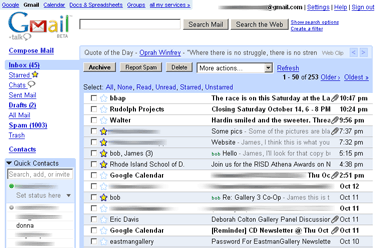
The benefit of any webmail system is being able to access your mail anywhere, from any Internet connected computer, anytime. Gmail offers a different and more streamlined interface. Like all these services, it has an address book, filters, folders (Google calls them 'labels'). Google has a mantra of doing things differently, and signing up for a Gmail account is certainly different, because you can't. Not without giving them your mobile telephone number, or getting an invitation from a Gmail user. Don't worry, if any of my clients are interested in getting a Gmail account, all they have to do is let me know and I will send them an invitation.Gmail is the best email solution I have used, and currently it is all I use for both my businesses and personal accounts.
Google makes money from this service in a controversial way, they serve adds to you based on the content of your emails. Google swears up and down that they do not read your email and only scan it to deliver the ads and they don't use that data for any other purpose. You have to trust Google to use this service, but the reality is that privacy is a concern with any online service.
Gmail is integrated with Google Calendar, which is also like its competitors, but better. It makes sharing calendars easy, I share my calendar with my wife and she with me, so we can always know what the other is doing. In addition to this, a Google Calendar can be shared with the world by being integrated with a web site, like so. Standard features include setting up reminders, sending invitations to events, and mobile device support.Both Gmail and Google Calendar take full advantage of Google's search technology, so you can easily find an email or event.
Recommended Site
DownloadSquad.com is a blog dedicated to new software, software issues, and stuff that people who like to read about those topics find interesting. They cover office suites to Internet applications to silly free games. I have found a lot of great stuff there that has helped me build many of my clients' web sites. It is probably too geeky for most people, but it is my Holy Grail. You finally know just how much of a nerd I am.
FreeWare
I was on the phone with a good friend (who is older and wiser) a few weeks ago when he asked me which version of (Microsoft) Word I was using. When I responded with a perky, "What's that?" I could feel his eyes rolling up into his skull. He knew he was in for another one of my Microsoft rants.I explained to him that I use Open Office for all my office application needs and that I don't have Word, Excel, or Power Point installed on my computer. That was as far as I got before I could sense he was glazing over. So I did not get a chance to complain about the cost, the size, the bugs, the software activation, virus vulnerability, or the system resources that Microsoft Office hogs. Open Office is a free and nearly complete Office suite similar to Microsoft Office.
Rather then ranting on and on about Micro$oft, I will just concentrate on Open Office, which is free, totally. Here is what it comes with:
- Writer is the word processor, it functions in a very similar way to Word and has all the common bells and whistles, but not the more obscure functions that Word has picked up over the years.
- Calc is a powerful spreadsheet with the standard tools to calculate, analyze, summarize, and present data in numerical reports or graphics. Similar to Excel
- Impress stands in for Power Point. This may be the least featured and trickiest to replace of the suite compared to Microsoft, but having been exposed to the contamination that is Power Point, I will do anything to avoid future contact and Impress is my ticket.
- Draw creates drawings, at least that is what I have heard. I have not used it.
- Base is the database program. That's right, Open Office even includes a database application.
OK, I like Open Office, but it does have some issues. It does open Microsoft documents and can even save to Word and Excel formats, but I have noticed on occasion that a Word document does not look quite right. I can see everything, but the formatting often does not come across perfectly. So it might not be the best solution for people who work with Word files all day. But I don't do that, so it is more then adequate for me.
Web Tech Revealed
What is HTML anyway?
Hyper Text Markup Language is the markup language used to create web pages. Note that I said 'markup language' and not programing language. A markup language is much simpler then a programing language. The main purpose of a markup language is to format text, where as the primary purpose of a programing language is to create simple to very complicated programs. If these types of languages were vehicles, the markup language would be a uni-cycle and the programing language would be the Star Ship Enterprise.In the early days the Internet was used mainly to publish and share research papers and HTML was well suited for that. But as time progressed and the Internet went commercial, HTML was not adequate. So HTML began to evolve and though much of it remains as it was, it is now also a framework to hang more powerful components on like Flash for animation and java script for fancy things like online credit card processing.
One of the fun things about HTML is just how easy it can be. All you need is a text editor like NotePad and some knowledge of HTML. That is it, no advanced degree or expensive programs. Of course there are advanced degrees and expensive programs for HTML if you like those sorts of things. Another nice feature of HTML is that it is a self replicating thing, there is a boat load of tutorials and help sites online (in HTML) to get you started or to help you with HTML. Here is one Example.
What is SEO anyway?
Search Engine Optimization is the process of tweaking your web site so that it appears as high in search engine results as possible. This is accomplished by understanding what the search engine (like Google, Yahoo, and MSN) are looking for. This is obviously a great idea and can be very important to an online business. Imagine if your online company that sells fur balls comes up as the very first link when people do a search for 'fur balls'. Now image if your fur ball company comes up as search result number 7,893,635. Someone looking through those search results would need to click through 789,363 pages of search results before they got to the one that has your link on it.
Suddenly SEO seems like a brilliant idea that you are compelled to implement right now. And that would be true but for a few annoying facts:
- There seem to be a number of SEO companies that are less then reputable and will promise to move you to the head of the line of search results. Well, they are frequently promising that to you and your closest 100 competitors.
- Google employs the smartest programmers around in order to create a search engine that produces the best, most relevant search results. They don't share their secrets, so people practicing SEO need to be at least as smart as Google programmers. But if they were that smart, Google would hire them. Slight paradox.
- Google, MSN, and Yahoo are always working to improve their search engine, that means that your web site needs to constantly shift to stay on top. That gets costly (except for my clients).
All is not lost, Google does in fact have some guidelines for good placement (they just keep secret their big ideas). These guidelines are actually relatively straight forward and logical. They suggest to build an easy to navigate sight with good content. It is that simple. That is what they are looking for and what all their fancy algorithms are designed to seek out.
So the moral of the story is that, if you have a well laid out web site with relevant content, you are already optimized. These are the qualities I endeavor to instill in the sites I work on.
Posted by
James Fryer
at
9:53 PM
0
comments
Labels: Computer/Internet, Web Development
Sunday, October 01, 2006
Dotster 'does' web design
Dotster now offers 'custom' web design. The part I like best is, "And the best part is our services are affordable, starting at just $199 for a basic 1-page site." Yeah, $200 for one page, what a deal. And what do they mean by custom? Their service starts at the 'Basic' level where the sucker customer can, "Pick a sample design. Our designers incorporate your content." Sounds like you get to choose one of their templates and they throw a bit of stuff in for you. Funny, sounds like the same thing that both Google and Microsoft do FOR FREE, with some work from you.
Granted, with Google you don't get a professional looking domain, but you do with Microsoft's 'Basic' Office Live service and its free. I have already written. about Google Pages and Microsot Office Live.
Dotster does not stop there, you can also pay them $859 for a single web page with their 'Intermediate' service which provides, "Start with a sample site. We design around your content with lots of extra features." So maybe you get to pick from a different set of their templates and then they make some minor changes to it. Then there is their 'Advanced' service for $1299 (also just one page). But they don't even bother trying to justify the expense saying rather, "When only the best will do." Best what?
And I am guessing that with these services you get to pay Dotster for their over priced domain registrations and lack-luster web hosting.
Now with Google Pages and Microsoft's Office Live you have to make the page yourself, but the tools are easy enough if you only need one page, and did I mention that both are free. No design fee, no registration fee, and no hosting fee.
I used to love Dotster, but they are just crazy now, their web hosting barely works, their registration is over priced, and now they have a very overpriced web design service. There are many independent web designers out there (including myself: JFDS) a cheaper and better job.
Posted by
James Fryer
at
10:34 PM
0
comments
Labels: Web Development
